Homework 1
- You are expected to work individually.
- Due: Monday February 2nd at 11pm EST (Baltimore time).
Learning Objectives
Warming/Brushing up (required background) technical skill-set for OOSE!
Before trying to make a submission for this homework, make sure you have successfully joined the course Github organization jhu-oose-sp26 as well as the course Gradescope page (check out the Logistics page on the course website!)
Getting set up!
- Please go to https://classroom.github.com/a/lJRnaWdC
- Login to your GitHub account and accept the invitation!
- A GitHub repository will be created for you. The repository is "private" and you must NOT change it to a "public" one. You must not add any collaborators to it. Clone this repository locally. Open the folder in your favorite text editor and start working on it.
Task: eventually! — A Simple Todo Application
For this homework you will implement eventually!, which is a simple yet extensible todo task management application. The goal of this homework is to design and implement a small, complete software system that allows users to manage tasks they intend to complete… eventually! :)
You can choose any software stack and it is entirely up to you how basic or complex you will make it.
The application focuses on core software engineering concepts such as requirements analysis, modular design, persistence, and client–server architecture. While the required functionality is intentionally minimal, you are encouraged to explore additional features and design choices to enhance usability and demonstrate creativity.
You may implement eventually! using any programming language, framework, or software stack of your choice.
Must-have features
- As a user, I want to add a new todo task with a description and a deadline, so that I can keep track of what I need to do and by when.
- As a user, I want to delete a todo task, so that tasks that are no longer relevant do not clutter my list.
- As a user, I want to see a list of my todo tasks along with their deadlines and completion status, so that I can understand what work remains.
- As a user, I want to mark a task as completed, so that I can track my progress and distinguish finished tasks from pending ones.
Nice-to-have
- As a user, I want to search for todo tasks by keyword, so that I can quickly find specific tasks.
- As a user, I want to filter or sort tasks by deadline or completion status, so that I can prioritize my work more effectively.
- As a user, I want to receive reminders before a task’s deadline, so that I do not forget important tasks.
- As a user, I want to edit an existing task’s description or deadline, so that I can update my plans when things change.
- As a user, I want to have my own account and personal task list, so that my tasks are private and separated from others
- As a user, I want to log in to the application, so that my todo tasks are securely associated with my account and only accessible to me.
General Requirements
- Your code must be hosted in the GitHub repository created using the provided GitHub Classroom invite link.
- The application does not need to be deployed, but it must run locally on a developer machine.
- The repository README must include:
- Clear instructions for setting up and running the application locally
- A description of the application’s architecture
- An explanation of the chosen tech stack
- The application must persist data using a database (e.g., SQLite, PostgreSQL, MongoDB, etc.).
- The application should ideally follow a client–server architecture.
- You are expected to follow good coding practices, including:
- Modularizing your code
- Writing readable and well-documented code
- Using meaningful variable, function, and file names
All must-have features listed above must be fully implemented for full credit, but you do not have to implement the nice-t-have ones. The goal here is to establish a baseline for your technical skill-set, and how much you can work and accomplish within the limited time. This includes how you test and document your application, organize your codebase, etc.
The end-product does not need to be a web app! If your technical experience is in building mobile or desktop apps, feel free to build it as one. The app must have the components of a minimal desktop/mobile app (UI + hosted database).
Make sure to include step-by-step instructions in README.md at the top level of you repository on how to run the app (locally). If you deploy your app somewhere online, please make sure to include the url also! Note that you do not have to "launch" you app online, but you need to give us step-by-step instructions how to run and test your app functionalities.
Save all your project files in a folder named hw1-task.
Submission
- Go to Gradescope course page.
- Click on Homework 1.
- You will be presented with the submission prompt.
- Click on "Connect to GitHub".
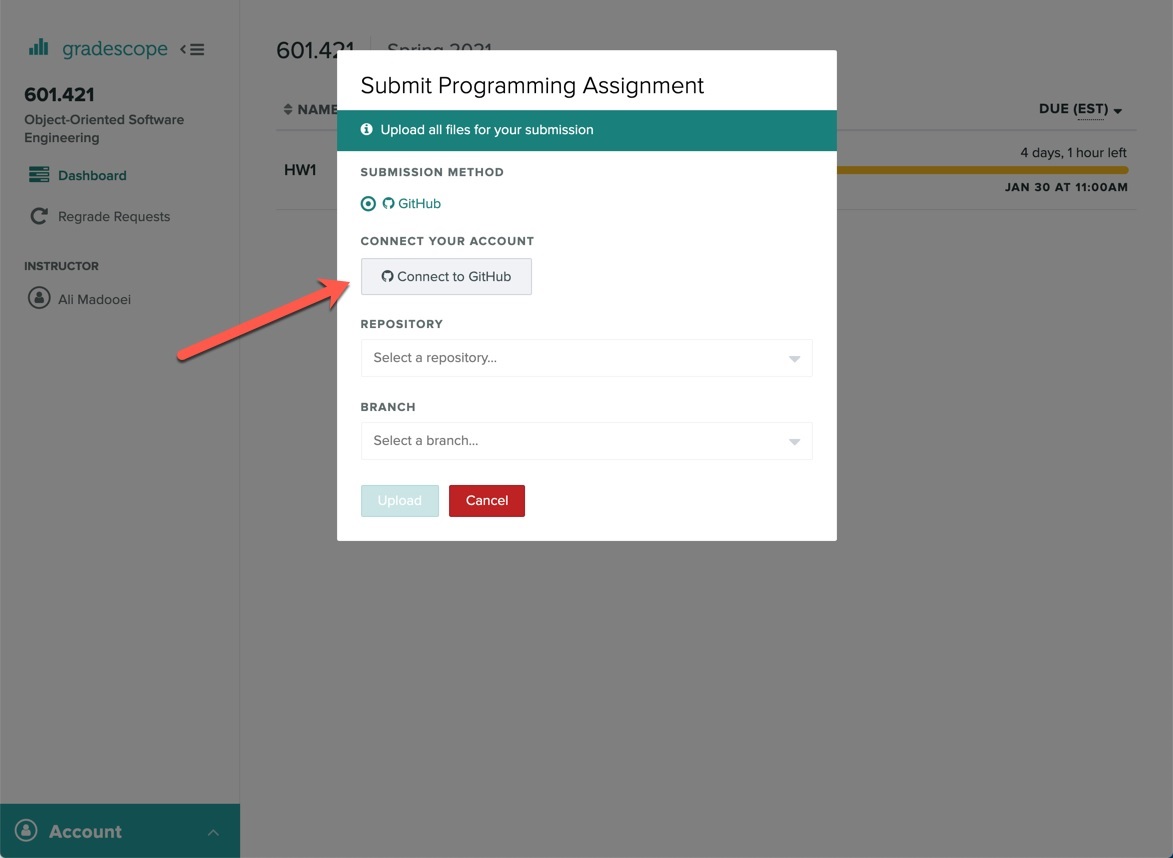
You will be redirected to authorize Gradescope to communicate with the GitHub API and access your repositories! Once Gradescope and GitHub are linked, they stay linked! You don't need to repeat this process.
- Select your homework repository.
- Select the "main" branch.
- Hit Upload!
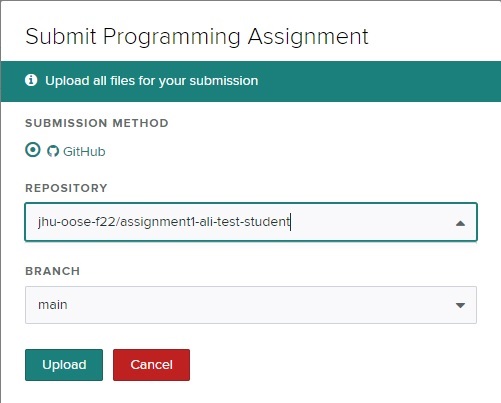
The files in your GitHub repository are now submitted as your homework submission.
Gradescope does not automatically fetch changes from your GitHub repository. If you make any updates to your repository, you must "resubmit" your work to Gradescope. (The resubmission process is exactly the same as the first submission.)
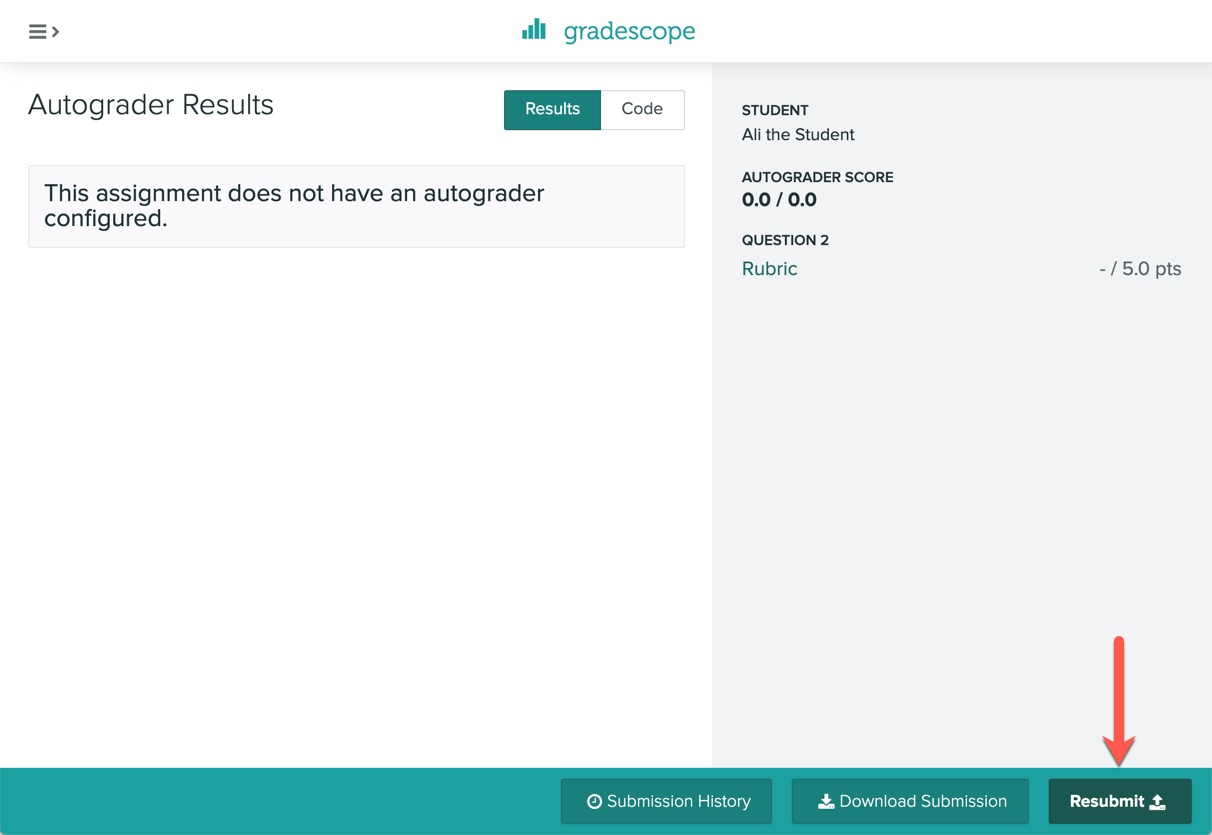
If submitting using the above-mentioned Github option does not work, you can always submit manually by uploading your files!