Iteration 4
Overview
By the end of this iteration you will release the Alpha Version of your software application (read about alpha release further below):
- By the end of this iteration, you must have the latest version of your app deployed online (e.g., on Heroku.)
- Also, this iteration is the time to start adding generic features such as a login (read login section below!)
- Finally, you want to start making the front-end of the app look nice(r) if you have been mostly focused on the back-end so far. If you were already invested on front-end development, use the time to futher develop your core features and nice-to-have features (on the back-end side of things!)
These are the deadlines for this iteration.
| Component | Date | Time |
|---|---|---|
| Retrospective for iteration 3 | Monday 3/30 | 11:00PM |
| Updated Software Requirement Specification | Monday 3/30 | 11:00PM |
| Updated Class Diagram | Monday 3/30 | 11:00PM |
| Updated Github Board | Monday 3/30 | 11:00PM |
| Deliverable (source code of a working app) | Sunday 4/12 | 11:00PM |
| Deployment (latest version of fully functioning app available online) | Sunday 4/12 | 11:00PM |
| Individual Contribution Report | Monday 4/13 | 11:00 PM |
Login Functionality
Designing and implementing a secure and robust login mechanism is difficult to get right. This is because much of a proper and secure login system has to do with security aspects of it. Therefore, this is best left to the security experts. After all, we are software engineers not securty experts! Besides, there are many solutions and APIs nowadays that can be leveraged to add a nice and secure login functionality to your app, so why reinventing the wheel? In here I am going to list several different user authentication approaches along with some resources for each approach:
1. Sign in via Popular Platforms Account
Most people today already have accounts with major platforms such as Google, Facebook, and X (formerly Twitter). You can let users authenticate using their existing credentials from these platforms instead of creating new ones for your app.
The following are some popular options to get you started (not an exhaustive list):
- Google Signin API
- NEW Google Signin API
- Facebook Sign in using Facebook SDK for Javascript
- X Signin API
- Sign In with Apple
I'm a big fan of social sign-in because it’s user-friendly and reduces friction. Almost everyone already has an account with one or more of these platforms, so signing in takes just a few clicks.
Users don't need to go through lengthy signup or email verification processes, nor remember yet another password.
Even better, your app does not store sensitive credentials such as passwords — that responsibility is securely handled by trusted identity providers like Google or Apple, who are experts in managing authentication and protecting user data.
You can even support multiple providers simultaneously, giving users the flexibility to sign in using the platform they prefer!
2. Dedicated Third-Party Solutions/APIs
If you've reviewed the previous section and still want to implement your own sign-up/sign-in functionality — or you prefer to use a dedicated authentication service — there are several robust options that can handle much of the heavy lifting for you. These services are typically highly secure, scalable, and customizable.
Below are a few popular solutions (both commercial and non-commercial):
- auth0
- Firebase Authentication
- Clerk
- Stack Authtip
This approach is most suitable when security and compliance are top priorities (for example, in a banking or healthcare app). While some of these services require paid plans, others — like Firebase Authentication or Clerk — are fairly straightforward to set up and integrate into a web app. They handle tasks like user management, password recovery, session handling, and multi-factor authentication out of the box.
While I have some familiarity with some of the above-mentioned APIs, I am not an expert in any of the above solutions and have not used them extensively in production environments. I include them here to give you starting points and awareness of alternative ways to add a user authentication layer to your app. It's up to you to explore these options further and decide which one best fits your app's requirements.
A deep dive into authentication frameworks and mechanisms is beyond the scope of OOSE, but I'd be happy to discuss your specific app needs and help you reason through which approach might make the most sense.
Retrospective for iteration 3
You must write a Retrospective for iteration 3. The retrospective is an opportunity for your team to inspect itself and create a plan for improvements to be enacted during the next iteration. Review what you had done in iteration 3; note things that you have and have not delivered, note the challenges you had, and reflect on how you shall proceed in the next iteration to do a better job. There is not specific format to the retrospective document and no minumin and/or requirements on its length, format etc. It is just meant to reflect on iteration 3 and use it to improve your next iterations. Write this in a file named retrospective_it3.md and upload it under docs folder in your group repo.
Update Software Requirement Specification
You only need to update the Requirement Specification Document if you want to make any changes to the specification of your proposed software project. That is, you can leave it as is, if you are happy with it.
Update Class Diagram
If there has been been any changes to your desgin since last iteration, make sure to update your class diagram to reflect the latest design of your software. Upload a new class diagram picture to the docs folder. Make sure to include it4 in the file name(s) e.g. it4_class_diagram1.png
Remember that your class diagram must be kept updated at all times. (i.e., iterations)
Project Planning: Giuthub Project Board
Similar to previous iterations, create three columns "It4-To Do" with preset To do, "It4-In Progress" with preset In Progress, and "It4-Done" with preset Done. You will need to keep the colmuns updated as you develop your app further. List all your to do tasks extracted from the user stories you plan to finish for iteration 4 under the "It4-To Do" column. When you start working on a task, move it under the "It4-In Progress" column, and when it is completed list it under the "It4-Done" column.
Ideally, you do not have any unfinished tasks from previous iterations. But, if there are unfinihsed tasks, move them over to the it4 columns and aim to get them done in this iteration.
In this iteration, you are releasing the alpha version of your software. In real world, this equals to releasing a software to limited audience. This means your "must have" features are all done and, ideally, the high priority "nice-to-have" feature(s) are also finished.
Final Deliverable
At the end of iteration 4, you must deliver the Alpha Version of your software application.
Your application must also be deployed (assuming you are developing a web app) to a platform like Heroku.
Alpha is an important milestone that you accomplish as a team while developing a software.
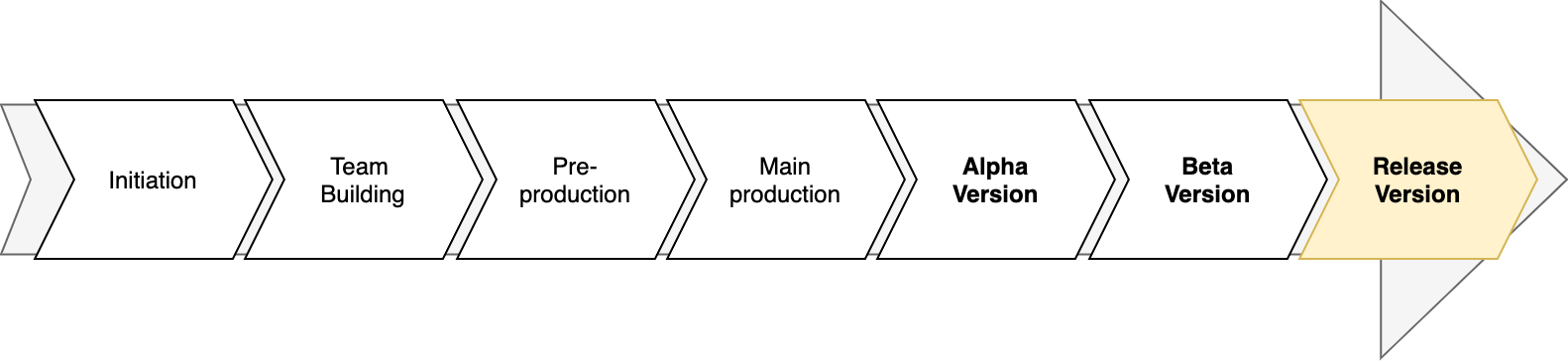
In this stage, the application's core features i.e. the must have features are working (although they may not be refined).
Once the Alpha stage has been met, the team then extensively test and refine the features along with other elements to improve the fidelity and meet the software design requirements.
After Alpha stage, the development heads to Beta and then finally, GOLD (final release).
To learn more about Software Release Life Cycle, refer to this Wikipedia article.
You must always keep your group repository updated with the latest changes; we will consider your last commit to the main branch by 11:00 PM on the deadline day as your submission.
Do not forget to update you project's README.md if needed.
Deployment
By the end of this iteration, a stable copy of your latest app must be deployed online. You can deploy to one of the followings but feel free to deploy to alternate platforms (if you have something specific in mind.):
Ideally, you also want to setup an automated deployment pipeline for your app similar to what you did in class. This will probably save you time and energy in the longer run, since you can set things up once and then rely on them thereafter, but it is not required! Your app must be online and fully functioning by the deadline.
Make sure to include the url of the app along with any particular instructions or things to note in your README.md.
Individual Contribution Report
Each member in the team must write a short individual report. This must be done individually, hence the name individual report!; you may not work on this together. This does not have to be long and there are no hard requirements on the format, length, content etc. of this document. However, you should use this to 1) reflect on your own individual performance in iteration 4, and 2) mention the names of any particular member(s) who you think excelled in the last iteration.
This should not be the case hopefully, but if you have major concerns about performance of any other member(s) i.e. someone who is not putting in the necessary effort/time, is not committed to the team's mission etc., make a mention of it in your individual report. We will check these individual reports and we will take necessary actions if needed. Submit your individual report to your personal repo in the jhu-oose organization in a file named it4_individual_report.md.
Submit the individual report to your private individual report repo, not the team repo!